


By using this site, you agree to the Privacy Policy and Terms of Use.
Accept
EveryTechEverEveryTechEver
  • News
    NewsShow More
    Acer Day 2026 Philippines: SB19 Concert at Araneta Coliseum
    August 31, 2026
    Power Mac Center Anniversary 2026: Mission 32 Sale & Events
    August 31, 2026
    Acer Philippines Tops Laptop Market for 20 Years
    March 17, 2026
    TCL Elevates the Olympic Winter Games Experience at Milano Cortina 2026
    March 17, 2026
    TCL Milano Cortina 2026 Olympic Winter Games
    March 5, 2026
  • Tech
    • Mobile
    • Computing
    • Auto
    • Cybersecurity
    • FinTech
  • Gaming
    GamingShow More
    Roblox RDC 2026 Updates: Standalone Apps, Wallet & AI Builder
    September 17, 2026
    Rapoo VH350S Review: A Budget Headset That Delivers
    Rapoo V Gaming Promo — Win eVouchers & Gaming Gear
    June 20, 2026
    Rapoo Gaming Peripherals Launch in Philippines
    March 19, 2026
    Globe AT HOME Launches Built-in Broadband
    February 28, 2026
  • Lifestyle
    • Entertainment
    • Shopping
    • Appliances
    • Wellness
  • How-To
  • Reviews
    ReviewsShow More
    Rapoo VH350S Review: A Budget Headset That Delivers
    Redmi 15C Review: All in, All Day Performance and Comfort
    Xiaomi Smart Band 10 Review: The New King of Wearables?
    Redmi Note 14 Pro+ 5G Review: The Midrange King of 2025?
    Aurvana Ace 2 Review: Creative’s Comeback Earbuds Impress
  • About Us
    • Contact Us
Search
© 2023 EveryTechEver. Your daily source of everything tech. All Rights Reserved.
Reading: Microsoft Windows Adds Color to Battery Icon
Share
Sign In
Notification Show More
Font ResizerAa
EveryTechEverEveryTechEver
Font ResizerAa
Search
  • News
  • Tech
    • Mobile
    • Computing
    • Auto
    • Cybersecurity
    • FinTech
  • Gaming
  • Lifestyle
    • Entertainment
    • Shopping
    • Appliances
    • Wellness
  • How-To
  • Reviews
  • About Us
    • Contact Us
Have an existing account? Sign In
Follow US
© 2023 EveryTechEver. Your daily source of everything tech. All Rights Reserved.
EveryTechEver > Blog > Features > Microsoft Windows Adds Color to Battery Icon
FeaturesNewsTech

Microsoft Windows Adds Color to Battery Icon

Windows 11: Colorful battery icon for quick status checks

Team EveryTechEver
Last updated: January 29, 2025 3:53 PM
Team EveryTechEver
Published: January 29, 2025
Share
2 Min Read
SHARE

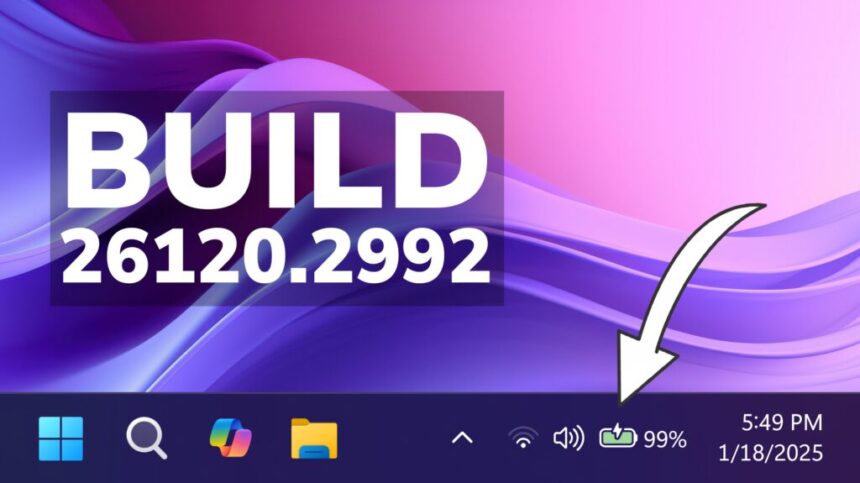
In today’s “Why Didn’t They Think of This Before” moment, Microsoft has rolled out a small but useful update to Windows 11, giving the battery icon a much-needed pop of color. This tweak makes it easier to quickly check your battery status at a glance, whether you’re on a laptop or tablet.

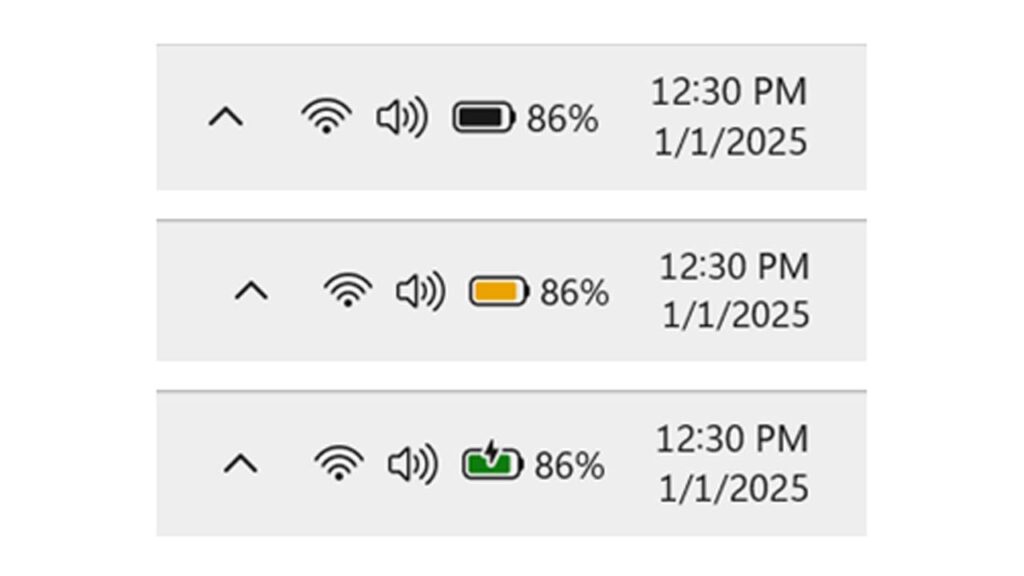
Previously, the battery icon stayed monochrome, showing either black or white depending on your theme. This made it harder to distinguish battery levels or charging status, leading to some confusion. With the new change, the color of the icon now reflects the battery’s current state, making it far more intuitive.

In the latest Windows 11 Insider Preview Build, Microsoft is rolling out a simple but effective change to the battery icon. The icon will now display different colors—green, yellow, or red—based on your battery’s charge level.
Windows

By default, the icon will show green when your battery is healthy. As the charge drops below 20 percent, it will shift to yellow, giving you a heads-up. If the battery gets critically low, the icon will turn red, ensuring you don’t miss that all-important warning.

- Advertisement -

The update also brings a small tweak to the charging icon, moving the lightning bolt to a less intrusive spot. This makes it easier to see exactly how much charge you’ve accumulated without the symbol getting in the way.

Microsoft says this change was one of the most requested by users. If you’ve ever thought your laptop was charging only to find it wasn’t plugged in, you’ll appreciate this update. While it may seem like a small adjustment, it’s a big help for avoiding those frustrating charging mishaps.

Kyndryl Reveals Eight Tech Trends to Watch in 2023
DHL Express and Brother Industries, Inc. Commit to Reducing Carbon Footprint
Low-cost Apple Vision and Smart Glasses to be released soon
realme GT Mode 2.0 Launches November 26
Samsung Galaxy M16 5G Design and Specs Unveiled
TAGGED:MicrosoftWindows 11

Sign Up For Daily Newsletter

Be keep up! Get the latest breaking news delivered straight to your inbox.
I have read and agree to the terms & conditions
By signing up, you agree to our Terms of Use and acknowledge the data practices in our Privacy Policy. You may unsubscribe at any time.
Share This Article
Facebook Copy Link Print
Share
ByTeam EveryTechEver
Zup Techies! Team EveryTechEver is our admin account for Press Releases. You can get in touch with us at press@everytechever.com.
Previous Article Nothing Phone (3a) Rumored with Big Display & 50MP Telephoto
Next Article iPhone SE 4 to Feature a Notch, Confirms Analyst
Leave a Comment Leave a Comment

Leave a ReplyCancel reply

Stay Connected

235.3KFollowersLike
69.1KFollowersFollow
11.6KFollowersPin
56.4KFollowersFollow
136KSubscribersSubscribe
4.4KFollowersFollow
- Advertisement -
Ad imageAd image

Latest News

TECNO CAMON Slim 5G Pre-Order: Win Up to ₱1 Million
Mobile
October 12, 2026
UGREEN MagFlow and Nexode Pro: New Chargers for Apple Devices
Mobile
October 5, 2026
XPENG Philippines Launch Price: Full X9 and L03 Lineup Revealed
Auto Lifestyle
September 28, 2026
GAC Kantar BrandZ Philippines 2026: Breakthrough Automotive Brand
Auto Lifestyle
September 17, 2026
//

Your daily source of everything tech.

//

We influence 20 million users and is the number one business and technology news network on the planet

Sign Up for Our Newsletter

Subscribe to our newsletter to get our newest articles instantly!

EveryTechEverEveryTechEver
Follow US
© 2023 EveryTechEver. Your daily source of everything tech. All Rights Reserved.
  • Privacy Policy
  • Terms of Service
  • Contact Us
Loading Comments...
Welcome Back!

Sign in to your account

Username or Email Address
Password

Lost your password?