


By using this site, you agree to the Privacy Policy and Terms of Use.
Accept
EveryTechEverEveryTechEver
  • News
    NewsShow More
    OpenAI’s First Hardware May Be AI Earbuds
    February 8, 2026
    PLDT and Smart Power Sinulog 2026 with Connectivity and Culture
    January 28, 2026
    When Safety Technology Becomes Part of Everyday Travel
    January 25, 2026
    Acer Tahanan MV: SB19’s Digital Homecoming
    December 28, 2025
    Open Christmas ‘Wrapped in Wonders’ at Power Mac Center
    December 5, 2025
  • Tech
    • Mobile
    • Computing
    • Auto
    • Cybersecurity
    • FinTech
  • Gaming
    GamingShow More
    Predator League 2026 Ends with an Epic Finale in New Delhi
    January 19, 2026
    Predator League 2026 Champions Crowned in New Delhi
    January 12, 2026
    Philips Evnia x Sonic Racing: Speed Meets Visual Brilliance
    December 19, 2025
    AOC Masters 2025 Unites Asia Pacific’s CS2 Fans
    October 22, 2025
    AOC Days 2025: Get a FREE Monitor and Other Epic Rewards!
    August 7, 2025
  • Lifestyle
    • Entertainment
    • Shopping
    • Appliances
    • Wellness
  • How-To
  • Reviews
    ReviewsShow More
    Redmi 15C Review: All in, All Day Performance and Comfort
    Xiaomi Smart Band 10 Review: The New King of Wearables?
    Redmi Note 14 Pro+ 5G Review: The Midrange King of 2025?
    Aurvana Ace 2 Review: Creative’s Comeback Earbuds Impress
    Marshall Major V Review: 100+ Hours of Playtime & Bold Sound
  • About Us
    • Contact Us
Search
© 2023 EveryTechEver. Your daily source of everything tech. All Rights Reserved.
Reading: Microsoft Windows Adds Color to Battery Icon
Share
Sign In
Notification Show More
Font ResizerAa
EveryTechEverEveryTechEver
Font ResizerAa
Search
  • News
  • Tech
    • Mobile
    • Computing
    • Auto
    • Cybersecurity
    • FinTech
  • Gaming
  • Lifestyle
    • Entertainment
    • Shopping
    • Appliances
    • Wellness
  • How-To
  • Reviews
  • About Us
    • Contact Us
Have an existing account? Sign In
Follow US
© 2023 EveryTechEver. Your daily source of everything tech. All Rights Reserved.
EveryTechEver > Blog > Features > Microsoft Windows Adds Color to Battery Icon
FeaturesNewsTech

Microsoft Windows Adds Color to Battery Icon

Windows 11: Colorful battery icon for quick status checks

Team EveryTechEver
Last updated: January 29, 2025 3:53 PM
Team EveryTechEver
Share
2 Min Read
SHARE

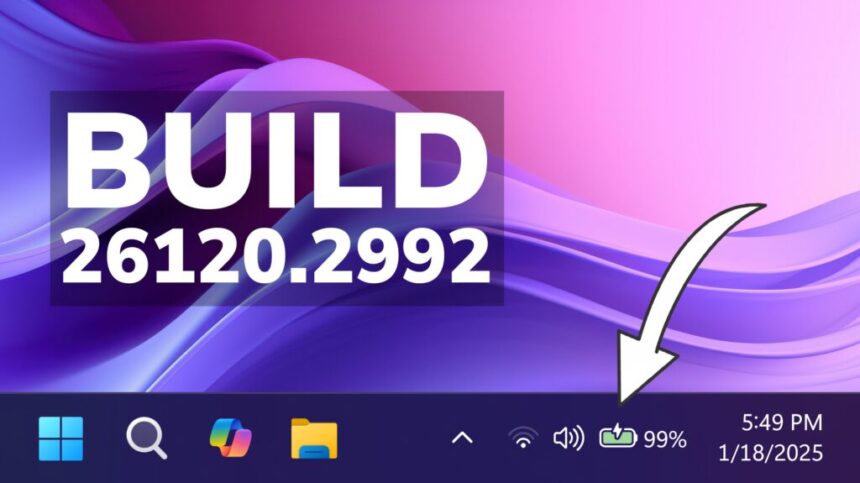
In today’s “Why Didn’t They Think of This Before” moment, Microsoft has rolled out a small but useful update to Windows 11, giving the battery icon a much-needed pop of color. This tweak makes it easier to quickly check your battery status at a glance, whether you’re on a laptop or tablet.

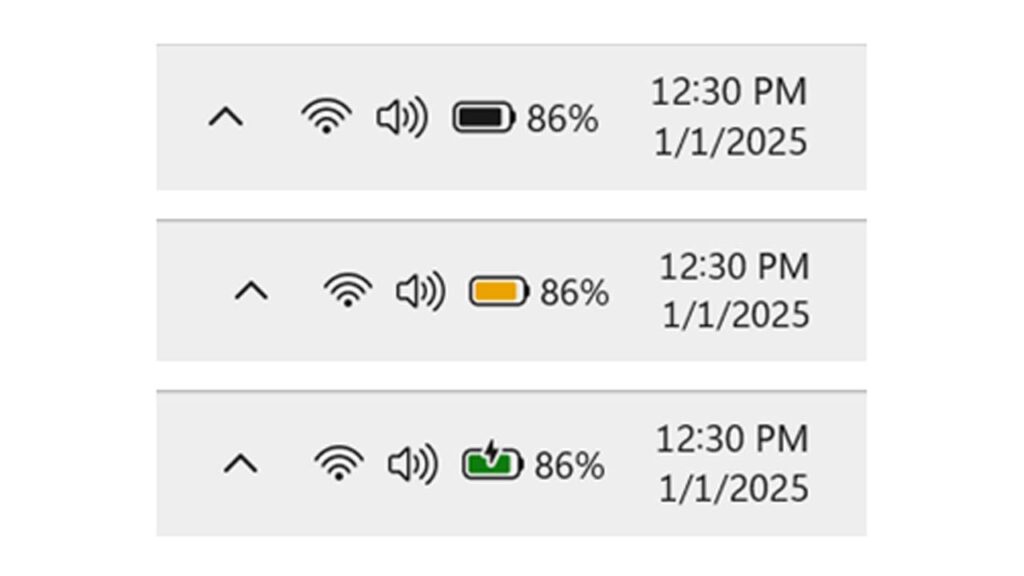
Previously, the battery icon stayed monochrome, showing either black or white depending on your theme. This made it harder to distinguish battery levels or charging status, leading to some confusion. With the new change, the color of the icon now reflects the battery’s current state, making it far more intuitive.

In the latest Windows 11 Insider Preview Build, Microsoft is rolling out a simple but effective change to the battery icon. The icon will now display different colors—green, yellow, or red—based on your battery’s charge level.
Windows

By default, the icon will show green when your battery is healthy. As the charge drops below 20 percent, it will shift to yellow, giving you a heads-up. If the battery gets critically low, the icon will turn red, ensuring you don’t miss that all-important warning.

- Advertisement -

The update also brings a small tweak to the charging icon, moving the lightning bolt to a less intrusive spot. This makes it easier to see exactly how much charge you’ve accumulated without the symbol getting in the way.

Microsoft says this change was one of the most requested by users. If you’ve ever thought your laptop was charging only to find it wasn’t plugged in, you’ll appreciate this update. While it may seem like a small adjustment, it’s a big help for avoiding those frustrating charging mishaps.


REDnote: The Alleged TikTok Alternative
Maya Empowers SMEs with All-in-One Digital Banking
Apple Invests $1.1B in Globalstar Satellite Services
Huawei Enjoy 70X Officially Launched
OPPO Reno13 Series 5G Launching in the Philippines
TAGGED:MicrosoftWindows 11

Sign Up For Daily Newsletter

Be keep up! Get the latest breaking news delivered straight to your inbox.
I have read and agree to the terms & conditions
By signing up, you agree to our Terms of Use and acknowledge the data practices in our Privacy Policy. You may unsubscribe at any time.
Share This Article
Facebook Copy Link Print
Share
ByTeam EveryTechEver
Zup Techies! Team EveryTechEver is our admin account for Press Releases. You can get in touch with us at press@everytechever.com.
Previous Article Nothing Phone (3a) Rumored with Big Display & 50MP Telephoto
Next Article iPhone SE 4 to Feature a Notch, Confirms Analyst
Leave a Comment Leave a Comment

Leave a ReplyCancel reply

Stay Connected

235.3KFollowersLike
69.1KFollowersFollow
11.6KFollowersPin
56.4KFollowersFollow
136KSubscribersSubscribe
4.4KFollowersFollow
- Advertisement -
Ad imageAd image

Latest News

iPhone 18 Pro Max Battery Leak Points to Major Power Upgrade
Mobile
February 8, 2026
Samsung Galaxy S26 Leaks Reveal Design and Battery Upgrade
Mobile
February 8, 2026
Honor 600 Series Rumored With 9,000mAh Battery
Mobile
February 8, 2026
OpenAI’s First Hardware May Be AI Earbuds
News Wearables
February 8, 2026
//

Your daily source of everything tech.

//

We influence 20 million users and is the number one business and technology news network on the planet

Sign Up for Our Newsletter

Subscribe to our newsletter to get our newest articles instantly!

EveryTechEverEveryTechEver
Follow US
© 2023 EveryTechEver. Your daily source of everything tech. All Rights Reserved.
  • Privacy Policy
  • Terms of Service
  • Contact Us
 

Loading Comments...
 

    adbanner
    Welcome Back!

    Sign in to your account

    Username or Email Address
    Password

    Lost your password?