


By using this site, you agree to the Privacy Policy and Terms of Use.
Accept
EveryTechEverEveryTechEver
  • News
    NewsShow More
    Zed Android Credit Card Launch Philippines
    February 16, 2026
    FLAMES Warning Signs for Encephalitis 2026
    February 16, 2026
    Power Mac Center Lucky Match Deals 2026
    February 16, 2026
    OpenAI’s First Hardware May Be AI Earbuds
    February 8, 2026
    PLDT and Smart Power Sinulog 2026 with Connectivity and Culture
    January 28, 2026
  • Tech
    • Mobile
    • Computing
    • Auto
    • Cybersecurity
    • FinTech
  • Gaming
    GamingShow More
    AGON by AOC x DAN DA DAN Anime Collab PH
    February 16, 2026
    Predator League 2026 Ends with an Epic Finale in New Delhi
    January 19, 2026
    Predator League 2026 Champions Crowned in New Delhi
    January 12, 2026
    Philips Evnia x Sonic Racing: Speed Meets Visual Brilliance
    December 19, 2025
    AOC Masters 2025 Unites Asia Pacific’s CS2 Fans
    October 22, 2025
  • Lifestyle
    • Entertainment
    • Shopping
    • Appliances
    • Wellness
  • How-To
  • Reviews
    ReviewsShow More
    Redmi 15C Review: All in, All Day Performance and Comfort
    Xiaomi Smart Band 10 Review: The New King of Wearables?
    Redmi Note 14 Pro+ 5G Review: The Midrange King of 2025?
    Aurvana Ace 2 Review: Creative’s Comeback Earbuds Impress
    Marshall Major V Review: 100+ Hours of Playtime & Bold Sound
  • About Us
    • Contact Us
Search
© 2023 EveryTechEver. Your daily source of everything tech. All Rights Reserved.
Reading: Keep your modem cool and safe, enjoy undisrupted connectivity
Share
Sign In
Notification Show More
Font ResizerAa
EveryTechEverEveryTechEver
Font ResizerAa
Search
  • News
  • Tech
    • Mobile
    • Computing
    • Auto
    • Cybersecurity
    • FinTech
  • Gaming
  • Lifestyle
    • Entertainment
    • Shopping
    • Appliances
    • Wellness
  • How-To
  • Reviews
  • About Us
    • Contact Us
Have an existing account? Sign In
Follow US
© 2023 EveryTechEver. Your daily source of everything tech. All Rights Reserved.
EveryTechEver > Blog > Tech > Telco > Keep your modem cool and safe, enjoy undisrupted connectivity
TechTelco

Keep your modem cool and safe, enjoy undisrupted connectivity

In today's digital age, your modem is the unsung hero of your home

Team EveryTechEver
Last updated: August 16, 2024 2:38 AM
Team EveryTechEver
Share
3 Min Read
SHARE

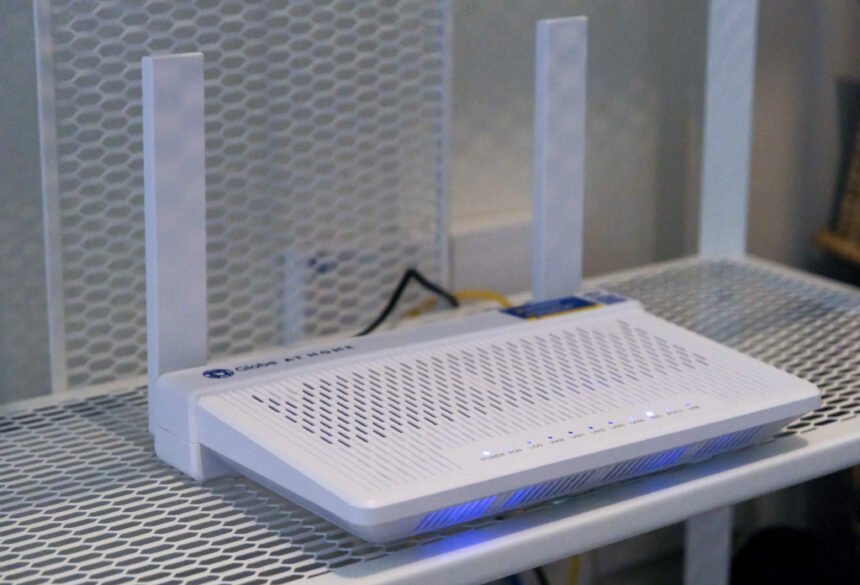
In today’s digital age, your modem is the unsung hero of your home. It powers your internet, enabling everything from streaming movies to remote working. But like any hardworking device, your modem needs some tender loving care to keep it running smoothly, especially when it comes to avoiding overheating. 

Overheating is your modem’s biggest enemy. It can lead to connectivity issues, performance degradation, and even hardware failure. Globe At Home shares five ways to keep your device cool and efficient:

  1. Place Your Modem in Open Areas
  • Ventilation is key: Ensure your device is placed in a well-ventilated spot. Avoid confined spaces such as cabinets or drawers where airflow is restricted.
  • Keep it uncovered: Do not place items on top of or around your modem. Covering it with books, sheets of paper, or decorative items can block airflow and trap heat.
  1. Keep It Away from Heat Sources
  • Distance from hot appliances: Position your modem away from heat-generating devices such as refrigerators and ovens. These appliances may raise the ambient temperature and affect your device.
  • Avoid direct sunlight: Sunlight may significantly increase the temperature of your modem. Place it in a shaded area away from windows to prevent overheating.
  1. Minimize Electrical Interference
  • Avoid other electronic devices: Keep your modem away from running electric appliances such as TVs, cordless phones, and personal computers. Consequently, these devices can emit electromagnetic interference, which not only affects performance but also contributes to heat buildup.
  1. Stability and Placement
  • Use a stable, flat surface: Ensure your modem is on a solid, level surface. Avoid soft or uneven surfaces that may block vents or cause the device to tip over.
  1. Use the Original Adapter
  • Power matters: Always use the original power adapter that came with your device. It’s designed to deliver the correct voltage and current. Using a different adapter may lead to power fluctuations, increasing the risk of overheating.

By following these tips, you can protect your device from overheating, ensuring that it operates efficiently and maintains a stable internet connection. Furthermore, taking good care of your device will help you avoid charges for replacement in case of damage.

“The modem is the gateway to WiFi connection. We encourage our customers to take care of it just as they look after their mobile phones and other devices that keep them connected. Being mindful of the location of the modem is key in preventing unexpected disruptions,” said Abigail Cardino, VP for Broadband Business at Globe.Remember, a properly placed modem is a safe modem. For more tips on optimizing your internet setup and fixing connection issues, check out this video. For more information about Globe, visit https://www.globe.com.ph/.


- Advertisement -

iPhone 17 to Feature Vapor Chambers for Cooling
DITO continues winning streak at Opensignal Mobile Network Experience Awards
Digital Edge accelerates growth in South East Asia and the Philippines
GOMO Unveils High-Speed GOMO Fiber Internet
Globe elected to prestigious GSMA Board
TAGGED:GlobeGlobe At HomeModem

Sign Up For Daily Newsletter

Be keep up! Get the latest breaking news delivered straight to your inbox.
I have read and agree to the terms & conditions
By signing up, you agree to our Terms of Use and acknowledge the data practices in our Privacy Policy. You may unsubscribe at any time.
Share This Article
Facebook Copy Link Print
Share
ByTeam EveryTechEver
Zup Techies! Team EveryTechEver is our admin account for Press Releases. You can get in touch with us at press@everytechever.com.
Previous Article How to Make Millions Before Grandma Dies on Netflix from September 12
Next Article Invest In Gold With Palawan Pawnshop Jewelry
Leave a Comment Leave a Comment

Leave a ReplyCancel reply

Stay Connected

235.3KFollowersLike
69.1KFollowersFollow
11.6KFollowersPin
56.4KFollowersFollow
136KSubscribersSubscribe
4.4KFollowersFollow
- Advertisement -
Ad imageAd image

Latest News

AGON by AOC x DAN DA DAN Anime Collab PH
Computing Gaming
February 16, 2026
Antioxidants for Heart Health from LAC Philippines
Lifestyle Wellness
February 16, 2026
Zed Android Credit Card Launch Philippines
FinTech News
February 16, 2026
FLAMES Warning Signs for Encephalitis 2026
News Wellness
February 16, 2026
//

Your daily source of everything tech.

//

We influence 20 million users and is the number one business and technology news network on the planet

Sign Up for Our Newsletter

Subscribe to our newsletter to get our newest articles instantly!

EveryTechEverEveryTechEver
Follow US
© 2023 EveryTechEver. Your daily source of everything tech. All Rights Reserved.
  • Privacy Policy
  • Terms of Service
  • Contact Us
Welcome Back!

Sign in to your account

Username or Email Address
Password

Lost your password?